
The 7 Best Couple Bucket List Apps in 2026 (Free and Paid)
Only 48% of married Americans aged 18 to 55 say they go on a date night at least once or twice a month, according to a survey of 2,000 people reported in the 2023 Date Night report from the National Marriage Project and the Wheatley Institute. Most couples don’t lack ideas. They lack a way to get one of them onto the calendar.
That’s the test we used for this list: does the app help two people go from “we should do that” to a date, and from the date to something they’ll remember? We compared seven options, from dedicated apps to the free tools already on your phone. Korby is our app; how we compared everything is explained below.
Our quick picks
- Korby: best overall, and the only one that keeps the idea, the date, the prep and the memory on one plan
- Cupla: best when your real problem is two busy calendars
- Lovewick: best for conversation questions and date ideas
- Apple Reminders: best free shared to-do list
- Apple Notes: best free shared checklist
- Google Keep: best free option for iPhone and Android couples
- Pinterest: best for collecting inspiration
Which one fits you two?
Our pick: Korby. It’s built for exactly this: a date and countdown on the idea you pick, a shared checklist, and the photos afterwards.
The best couple bucket list apps at a glance
| App | Best for | A year for both of you | Platforms | Rating (US App Store) |
|---|---|---|---|---|
| Korby | Actually doing the things on your list | $29.99 after a 14-day free trial, or $79.99 once | iPhone | New, not enough ratings yet |
| Cupla | Two busy calendars and a date-night habit | Free plan; Premium from $34.99 | iPhone, Android | 4.7 (2.3K) |
| Lovewick | Conversation questions and date ideas | Free tier; Plus $29.99 | iPhone, Android | 4.8 (1.9K) |
| Apple Reminders | A free shared to-do list | Free | iPhone, iPad, Mac | Built in |
| Apple Notes | A free shared checklist | Free | iPhone, iPad, Mac | Built in |
| Google Keep | Couples with an iPhone and an Android | Free | iPhone, Android, web | Not compared |
| Collecting inspiration | Free | iPhone, Android, web | Not compared |
Cupla lists several prices; we show its lowest yearly one. Cupla’s help center and Lovewick’s replies to App Store reviews both say one subscription covers both partners.
Why most couple bucket lists never get done
A list in a notes app fails in three predictable places. Each one has research behind it, and each one is something a good app should fix.
- No date, no plan. A meta-analysis of 94 independent tests found that deciding when and where you’ll do something has a medium-to-large effect on whether it happens, compared with only intending to (Gollwitzer and Sheeran, 2006). An idea without a date is a wish.
- The waiting is half the fun, if you can see it. In an experience-sampling study of 2,266 adults, people looking forward to an experience reported more happiness, pleasantness and excitement than people looking forward to a purchase (Kumar, Killingsworth and Gilovich, 2014). A countdown you both see keeps that anticipation going.
- New beats nice. Couples who did something novel and exciting together reported higher relationship quality afterwards than couples who did something mundane (Aron et al., 2000). The Date Night report makes the same point: skip the default dinner and a movie.
So the questions to ask of any app are simple: can both of you add ideas, can one of them get a date and a countdown, is there room for the prep, and does anything remain once you’ve done it?
How they compare on what matters
| What matters | Korby | Cupla | Lovewick | Reminders | Notes | Keep | |
|---|---|---|---|---|---|---|---|
| Built around | Your bucket list | A shared calendar | Questions and date ideas | To-dos | Notes | Notes | Inspiration |
| Both of you add and edit | ✓ | ✓ | ✓ | ✓ | ✓ | ✓ | ✓ |
| Starter ideas built in | 100+ | — | 750+ | No | No | No | Search pins |
| Date and countdown on a plan | ✓ | Date Planner, key-date countdowns | Dates, date-night countdowns | Due dates | No | Reminders | No |
| Checklist on the plan itself | ✓ | Separate to-dos | — | Subtasks | Checklist in a note | Checklist in a note | No |
| Turns into a memory with photos | ✓ | ✓ Date Memories | ✓ Timeline | No | No | No | No |
| All four on the same plan | ✓ | Ideas and to-dos kept separate | No prep checklist listed | No | No | No | No |
| One price covers both of you | ✓ | ✓ | ✓ | Free | Free | Free | Free |
| Pay-once option | $79.99 | — | — | Free | Free | Free | Free |
| Android | No | ✓ | ✓ | No | No | ✓ | ✓ |
Based on each app’s US App Store listing, release notes and help pages, checked October 14, 2026 (for Korby, our listing and site). “—” means the listing doesn’t mention it. “All four on the same plan” means one item that starts as a shared idea, gets a date with a countdown and its own prep checklist, and becomes a memory with photos.
How we compared them
We build Korby, so we know it in detail. We compared it with two widely used couples apps that include shared wishlists, Cupla and Lovewick, and with the free tools couples most often use instead. For each one we used what its maker publishes: the US App Store listing and release notes, help pages, and the developer’s own replies to reviews. Everything was checked on October 14, 2026, and where a source is silent, the table says so instead of guessing.
1. Korby: best overall for actually doing the things on your list
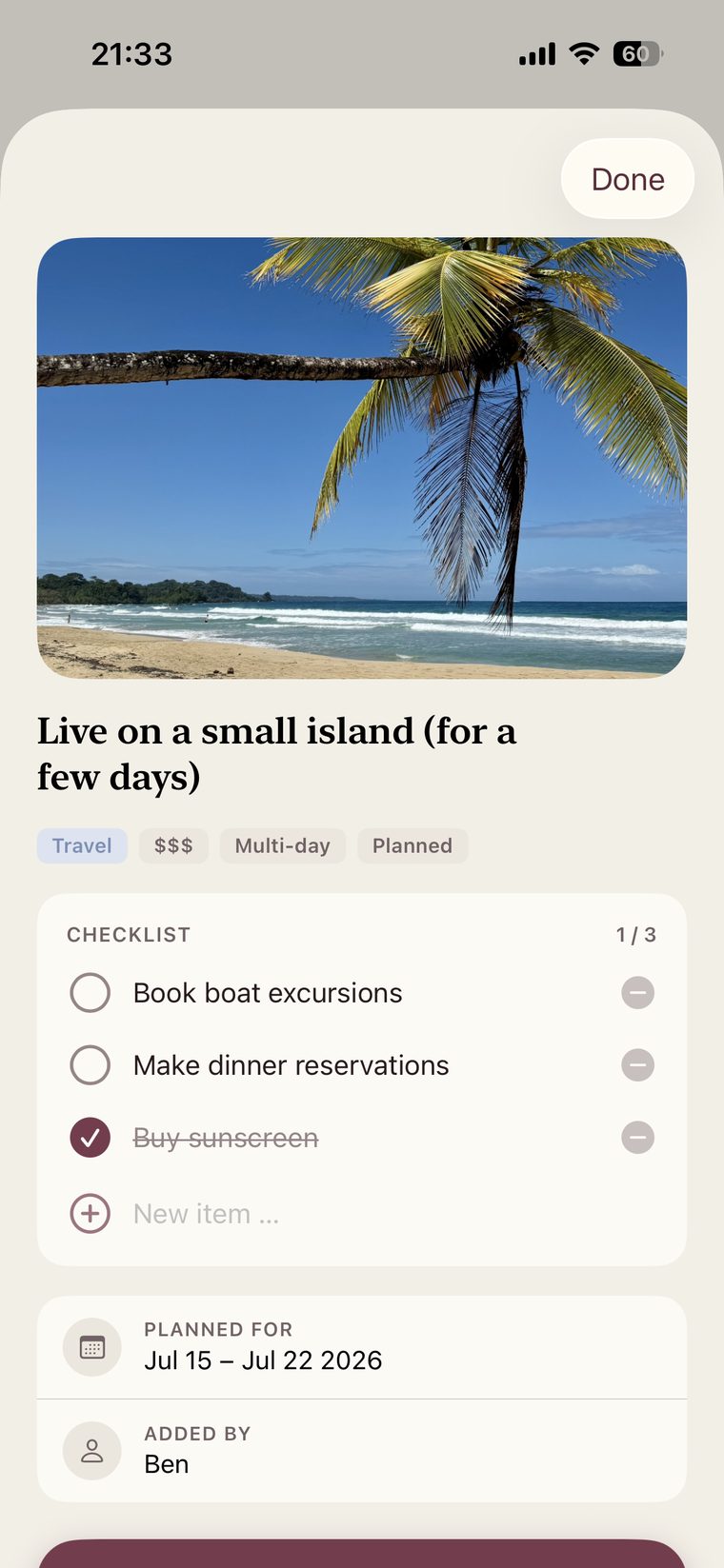
Korby does one job and is built entirely around it. Ideas from both of you collect in Someday. When you pick one and give it a date, it moves to Planned, starts counting down on both phones and gets a checklist you split between you. When you’ve done it, it lands on a shared timeline with its date, photos and a word for how it felt. Other apps here cover parts of that path; Korby is the only one that keeps the idea, the countdown, the prep checklist and the memory on the same plan, which is exactly where a notes-app list breaks down.
Where it shines
- The whole path in one place: ideas, a date with a countdown, a shared checklist and the memory afterwards
- Three lists, not one pile: Someday for ideas, Planned for anything with a date, Dreams for the once-in-a-lifetime ones
- 100+ starter ideas across ten categories, from Outdoor to Seasonal
- Secret plans you can hide until you’re ready to reveal them
- A gentle yearly count of what you’ve done together, with no streaks, scores or feed
- Works offline and syncs to both phones when you’re back online
- One subscription covers both of you, and it’s the only app here that advertises a pay-once option
Where it falls short
- iPhone only: no Android or iPad app yet
- No free plan after the 14-day trial
- New on the App Store, so there aren’t enough ratings to show yet
- Fewer starter ideas than Lovewick (100+ against 750+)
Try Korby free for 14 daysOne subscription for both of you. No ads, no feed.
2. Cupla: best when your real problem is two busy calendars
Cupla is a shared calendar first. It puts both of your schedules side by side and syncs with the calendars you already use. Its Date Planner lets you tag any event as a date, set a goal for how often you go out and get a nudge when it’s been a while, and each date becomes a Date Memory you can add a photo and notes to. Around that sit shared to-dos, wishlists for dates, gifts and trips, countdowns to key dates and an AI assistant you can switch off. If you can never find an evening you’re both free, it solves that better than anything here.
Where it shines
- Both schedules side by side, synced with Apple, Google and Outlook calendars
- A Date Planner with a date goal and gentle nudges; past dates become Date Memories with photos
- Wishlists for dates, gifts and trips, including ideas saved from Instagram or TikTok
- Countdowns to key dates and upcoming trips
- Runs on iPhone and Android; one Premium subscription per couple
Where it falls short
- The bucket list is one feature among many rather than the center of the app
- Wishlist ideas and prep to-dos sit apart from the dated plan
- The free plan only shows a limited window of your partner’s items around today
3. Lovewick: best for conversation questions and date ideas
Lovewick is built around question cards and a big library of date ideas. You can browse 750+ free ideas, filter them by time, cost or long distance, save them to shared wishlists, put dates on the ones you schedule and hide surprises from your partner. Checked-off ideas feed a memory timeline.
Where it shines
- 750+ free date ideas with useful filters, especially for long distance
- 1,000+ free conversation questions
- Shared wishlists with dates, surprises and a memory timeline
- Runs on iPhone and Android; the developer says one Plus subscription covers both partners
Where it falls short
- Questions come first; planning is a secondary feature
- No per-idea prep checklist mentioned in the listing
- Some long-time users were unhappy when free daily questions were cut back
- English only
4. Apple Reminders: best free shared to-do list
If you both use iPhone, share a list in Reminders through iCloud and you can both add, edit and tick off ideas. Due dates and subtasks cover the basics of planning. It won’t suggest ideas or count down to anything, and completed items keep no photos or notes about how it went.
Where it shines
- Free and already installed
- Due dates and subtasks
- Works on iPhone, iPad and Mac
Where it falls short
- Completed items keep no photos or memories
- No ideas to start from
- Everyone needs an Apple Account
5. Apple Notes: best free shared checklist
Most couple bucket lists start here: a shared note with a checklist. Apple Notes lets you invite your partner to collaborate on a note, so both of you can add and tick items. It’s the quickest way to start and the easiest list to forget about.
Where it shines
- Free and already installed
- Shared checklists you can both edit
- Photos and sketches in the same note
Where it falls short
- No dates, reminders or countdowns
- One long note gets hard to scan
- Everyone needs an Apple Account
6. Google Keep: best free option for iPhone and Android couples
If one of you uses Android, Google Keep is the simplest shared list that works on both phones. Add your partner as a collaborator and you can both edit text, lists and images. Each of you can set your own reminders on a shared note.
Where it shines
- Free, on iPhone, Android and the web
- Both of you can edit lists and images
- Reminders on notes
Where it falls short
- Reminders are personal rather than shared plans
- No ideas to start from
- Nothing to look back on afterwards
7. Pinterest: best for collecting inspiration
A shared Pinterest board is a good place to gather ideas: invite your partner as a collaborator and you can both save and organize pins. It’s an inspiration tool, though. Nothing on a board ever gets a date.
Where it shines
- Endless ideas to search
- Both of you can save and organize pins
- Free on every platform
Where it falls short
- No dates, reminders or checklists
- Built for browsing, not planning
- Easy to collect and never act
The bottom line
If your bucket list already has plenty of ideas and too few dates, Korby is the logical choice. It’s the only option here that keeps the idea, the date and countdown, the prep checklist and the memory on one plan; at $29.99 a year it costs the same as Lovewick Plus and less than Cupla Premium’s lowest yearly price; and it’s the only one that advertises a pay-once option.
- Your problem is finding time: Cupla.
- You want conversation prompts and endless ideas: Lovewick.
- You want to spend nothing: Apple Notes or Reminders, or Google Keep if one of you uses Android.
Whichever you choose, use the same test: within a week, at least one idea should have a date.
Start your list in Korby14 days free. One subscription covers you both.
Frequently asked questions
What is the best couple bucket list app?
For actually doing what’s on your list, Korby: it’s the only option here that keeps the idea, a dated countdown, a shared prep checklist and the memory with photos on one plan. One subscription covers both of you. Cupla is better if your main problem is coordinating calendars and keeping a date-night habit, and Lovewick if you mainly want conversation questions and date ideas.
Is there a free couple bucket list app?
Apple Notes, Apple Reminders, Google Keep and Pinterest are free ways to share a list. Cupla and Lovewick have free plans with paid upgrades. Korby is free for 14 days, then paid.
Do both partners have to pay?
No, not for the three paid apps here. Korby covers both of you with one subscription and your partner joins with a code. Cupla’s help center and Lovewick’s developer both say the same for their subscriptions.
Can we use a couple bucket list app on iPhone and Android?
Cupla, Lovewick, Google Keep and Pinterest work on both. Korby is iPhone-only for now, so a mixed couple is better served by one of those.
Why use an app instead of a shared note?
A note holds ideas but doesn’t help them happen. Research on planning finds that deciding when and where you’ll do something makes it meaningfully more likely to happen, and looking forward to an experience is part of its enjoyment. An app built for this gives each idea a date, a countdown and a checklist, and keeps the memory afterwards.